Python-based SQLite artifact parser and deleted-record recovery lab
Based on information from the Sheriffs Department on what their mobile forensics unit does.:
The unit primarily specializes in Mobile Forensics, focusing on the preservation, acquisition, and analysis of cellular devices, which is a critical source of evidence in modern investigations. We utilize specialized tools to extract, parse, and interpret complex datasets. As the industry shifts from SQLite databases toward other deeply nested data structures, your experience with Python and SQL would be particularly valuable to our work. Both fields rely on the same technological DNA. If IIT is about building and managing the digital house, Mobile Forensics is about understanding how every brick was laid. Both require a heavy understanding of SQL and SQLite. In IIT, you use it to manage data flow; in Mobile Forensics, you use it to recover deleted messages or location artifacts in app databases. In IIT, Python automates administrative tasks; in Mobile Forensics, it is used to write custom scripts to parse data that commercial tools might miss.
Trying to familrize myself with these tools before going in.
tools: Sqlite, Sql, Python
Creating SQLite Database
The first step of this project is creating the fake database to use for the deletion and they recovery of the data. There are datasets out there for this training purpose but since it is my first time I figuered I would just create my own.
create_db.py
Using sqlite in python, i was able to create a lab database and start to create tables like seen below with cursor.
import sqlite3

connection = sqlite3.connect("lab.db")
cursor = connection.cursor()

cursor.execute('''
    CREATE TABLE IF NOT EXISTS messages (
        id        INTEGER PRIMARY KEY AUTOINCREMENT,
        contact_id INTEGER,
        content   TEXT NOT NULL,
        timestamp TEXT NOT NULL,
        direction TEXT NOT NULL
    )
''')
Adding Data
I then had ChatGPT create some data to insert into the db
cursor.executemany('''
    INSERT INTO contacts (name, phone, email, notes)
    VALUES (?, ?, ?, ?)
''', [
    ("Greg Harmon",    "555-304-1782", "greg.harmon@email.com",  "College friend"),
    ("Sara Tillman",   "555-217-9934", "sara.t@webmail.net",     "Work contact"),
    ("Mike Delaney",   "555-408-5521", None,                     "Neighbor"),
    ("Priya Nath",     "555-619-2207", "priya.nath@inbox.com",   None),
    ("Carlos Mendez",  "555-713-8843", None,                     "Old roommate"),
Then use a horrible written python script to verify the data
verify_db.py
cursor.execute('''
               select *
               from messages
               ''')
row = cursor.fetchall()
print(row)
Now we have a SQLite database with four linked tables (Calls, Messages, Contacts, and Locations) to provide realistic sample data for this project. Next i’m going to delete some of the data and use HxD to try and see what actually happens to the db file before recovery.
Delete some records fom the main db (not just wal)
Using the cursor we can delete id 1 and 3 from the messages table and id 2 from the contacts table.
cursor.execute("DELETE FROM messages WHERE id IN (1, 3)")
cursor.execute("DELETE FROM contacts WHERE id = 2")
We also need to force the Write-Ahead Log so that these deletions go straight to the main .db file
cursor.execute("PRAGMA wal_checkpoint(TRUNCATE)")
Without this line, the deletions might only live in the .db-wal file and the main .db file might not change.
Open our .db file in a hex editor
Im using HxD because its free. The deletion script we used deleted he (1,3) from the messages table which was the message “Not much, you free later?” Now after the deletion we can see in the hex editor that the message has not really been deleted yet. Just using ctrl + f we can look for the string “Not much, you free later?” and find it still in the .db file.
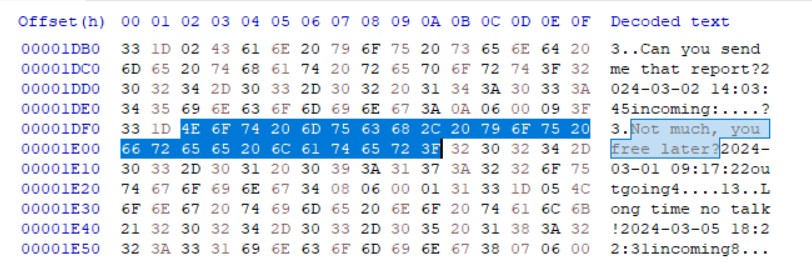
Now this is not totally relivent because if you had a crazy large database and the person deleted the message you would have no idea what to search for. However we just saw and proved that deletion from the .db file does not mean it is inaccsessable. This will allows us to write a script that reads throuhg the raw bytes in binary mode and looks for patterns, deleted or not.
recover.py
Ok so we need to write a script that reads lab.db as raw bytes while completely ignoring the sqlite3 module and pulling out deleted record data from free space. I am still in the process of learning python, so I had a lot of help from claude with this script.
def extract_strings(data, min_length=4):
    """Pull readable ASCII strings out of raw bytes."""
    strings = []
    current = []

    for byte in data:
        if 32 <= byte <= 126:  # printable ASCII range
            current.append(chr(byte))
        else:
            if len(current) >= min_length:
                strings.append("".join(current))
            current = []

    if len(current) >= min_length:
        strings.append("".join(current))

    return strings


PAGE_SIZE = 4096

with open("lab.db", "rb") as f:
    raw = f.read()

total_pages = len(raw) // PAGE_SIZE
print(f"Database size: {len(raw)} bytes | Pages: {total_pages}\n")

for page_num in range(total_pages):
    start = page_num * PAGE_SIZE
    end = start + PAGE_SIZE
    page_data = raw[start:end]

    strings = extract_strings(page_data)

    if strings:
        print(f"--- Page {page_num + 1} (offset {hex(start)}) ---")
        for s in strings:
            print(f"  {s}")
        print()
This script opens the db file in binary mode with open("lab.db", "rb"), this lets Python reads the raw bytes of the file exactly as they exist on disk.
The main part of the script is the extract strings function. This function loops through every byte in a given chunk of data and checks whether each byte falls between ASCII values 32 and 126, which is the ASCII printable charecters. When it finds enough of these charecters to be meaningful (4 at least) it saves it as a string.(String Carver)
The main body of the script then divides the database file into 4096-byte chunks called pages, which is SQLite’s default page size, and runs extract_strings() on each one. It prints every string it finds along with the page number and byte offset, so you know exactly where in the file each piece of data came from.
Ended up getting some valuable info from thei project but got a lot better resource from forensics labs coming.